

Bypassing FRP lock or Google Accounts is one of the most common but tricky things to do. So, HushSMS is here to help you. It helps you to bypass FRP Lock by sending coded messages. Initially, the App was available only for Samsung devices. Now, you can use it on all Android devices running on 6.0 or later OS version. It is free and safe to use. Besides, it features a beginner-friendly interface that makes it easy to use too. The App has more features; keep reading the article to learn about them.
Contents
About HushSMS
HushSMS is a short messaging App that lets you send messages that only phone carriers can. Users can use it to bypass FRP lock or Google Accounts on Samsung or other Android devices. It sends coded messages to the locked phone. These messages are scripts and modules that send the locked device’s information to your phone. Moreover, you can perform penetration tests with the App that helps you find the system’s weaknesses.
In addition, it offers different options for sending messages. It includes Normal SMS (up to 160 characters), Ping, WAP Push SI (40 characters), MMS Notification (30 characters), and WAP Push SL (40 characters). The MMS Notification doesn’t work on iPhone. Although the App works fine, it sometimes does not work properly without Xposed Framework. And not all mobile phone companies support this procedure.
Features
- You can unlock FRP on any Samsung mobile running on 6.0 or later Android version.
- The App can also unlock Google Accounts of other locks on all Android devices.
- It sends information about the locked device to your other device without erasing or affecting the user data.
- You can send Normal SMS of up to 160 characters, Ping, WAP Push SI (service status) of up to 40 characters, MMS Notification of up to 30 characters, and WAP Push SL (service load) of up to 40 characters.
- It does not require root access, so you don’t need to root your device to use the App.
- The App does not require a subscription. And there are no hidden charges involved.
- It is a small and lightweight App.
- The App is 100% safe and ad-free.
You can bypass FRP lock with other Apps like FRP Bypass Apk and Technocare Apk.
How to Install HushSMS APK
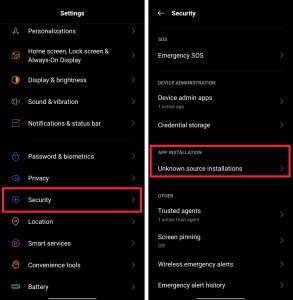
Step 1: Enable Unknown Sources
- To install this application, set up your Android device first for installation.
- Open your Security Settings and enable the Unknown Sources installation. Skip the step if already enabled.
Step 2: Download and Install the APK
- Download the HushSMS APK on your device. It is small in size, so downloading will not take a lot of time.
- Once downloaded, find the App in your device’s storage and tap on it.
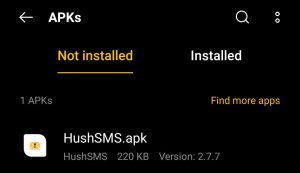
- Now, start installing the App by tapping on the Install option.

- The installation process will hardly take a minute. And when it is installed, you can Open it.

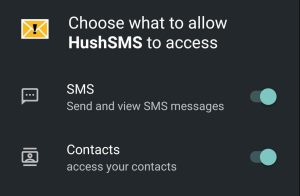
- It will ask you to allow SMS and Contacts access. Allow it to send and view SMS and access your contacts. And then start using it.
FAQs
What is HushSMS used for?
You can use the App to send short messages that only phone carriers can and bypass FRP lock, Google Account, or other locks.
Is HushSMS safe?
Yes, the App is safe to use. You can use it on all Android devices running on 6.0 or later Android OS.
How to use HushSMS?
The App can send short-coded SMS to FRP-locked or other locked devices to unlock them. You can send Normal SMS, Ping, WAP Push SI, WAP Push SL, and MMS Notification.
Is HushSMS free?
Yes, it is free. You don’t require a subscription to use the App. And there are no hidden charges involved.
Does HushSMS require root access?
No, it does not require root access. You can use it without rooting your device.
Conclusion
So, that was all about the HushSMS App. As mentioned earlier, the App was initially available for only Samsung devices to unlock FRP. But now, it is available for all Android devices running on 6.0 or later OS. It lets you send Normal SMS, Ping, WAP Push SI, WAP Push SL, and MMS Notification. The App is safe and easy to use. And you can use it to unlock FRP, Google Accounts, or other locks with simple steps without losing the user’s data. So, download the App and install it to unlock your locked Android devices.