

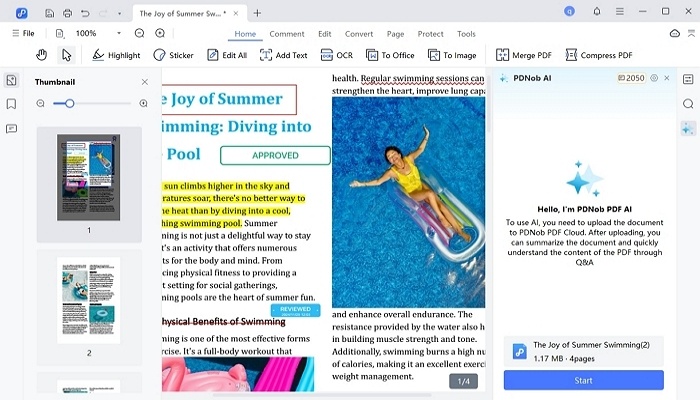
PDNob PDF Editor for Mac is a comprehensive, AI-powered PDF solution designed to enhance productivity and streamline document management for both Windows and Mac users. Packed with a wide range of powerful tools, it allows individuals and businesses to effortlessly manage, edit, organize, convert, and secure their PDF files. Whether you need to edit text, images, or layouts, perform OCR on scanned documents, annotate PDFs, or extract key insights using AI summarization, PDNob PDF Editor for Mac everything you need to work efficiently with PDF documents.
Key Features:
View and Navigate PDNob PDF Editor for Mac offers an intuitive, user-friendly interface for viewing PDFs of all sizes. Users can choose from various viewing modes, including single-page, continuous scrolling, and full-screen mode, to enhance reading and browsing experiences. Whether you're reviewing contracts, reading reports, or navigating through long documents, PDNob ensures smooth and efficient navigation.
Edit PDF Content: With PDNob PDF Editor for Mac, you can directly edit PDF content without converting it to another format. Modify text, adjust fonts, add or replace images, and change page layouts effortlessly. This feature is ideal for professionals who need to make quick updates to PDF documents, such as correcting typos, changing images, or adjusting formatting on the go.
Annotate and Collaborate: Annotating PDFs is made easy with a wide range of markup tools. You can highlight, underline, and strike through text, insert comments, sticky notes, and shapes, or even add stamps and drawings. This feature is perfect for team collaboration, allowing users to leave feedback, add insights, or suggest edits without altering the original content.
OCR (Optical Character Recognition): One of the standout features of PDNob PDF Editor for Mac is its powerful OCR technology, which converts scanned documents and images into editable, searchable text. This makes it easy to extract text from images, handwritten notes, or scanned PDFs, and edit or search the content as needed. With OCR, you can turn a scanned PDF into a fully editable document, saving time on manual data entry and improving productivity.
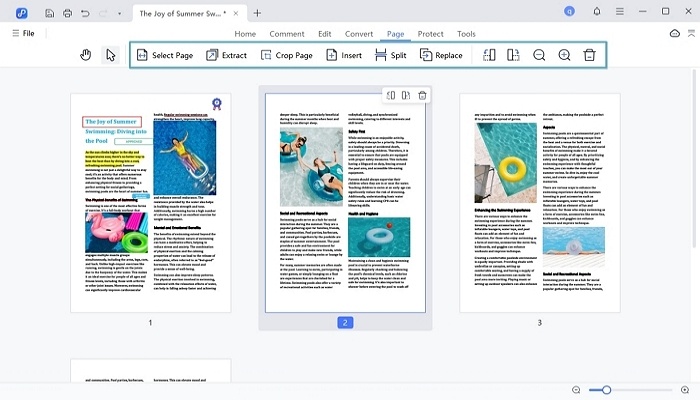
Organize PDFs:PDNob PDF Editor for Mac includes a robust set of tools for managing PDF files. You can merge multiple PDFs into one file, split a large document into smaller sections, and rearrange, rotate, or delete individual pages. Whether you need to combine reports or organize lengthy documents, PDNob PDF Editor for Mac helps you do it with ease, ensuring a smoother document workflow.
Convert PDF Files: With PDNob PDF Editor for Mac, you can quickly convert PDFs to various formats, including Word, Excel, PowerPoint, and image formats like JPEG and PNG. Conversely, you can also convert other document types back to PDF. This flexibility makes it easy to repurpose your PDF content or share it in other formats while retaining the original layout and formatting.
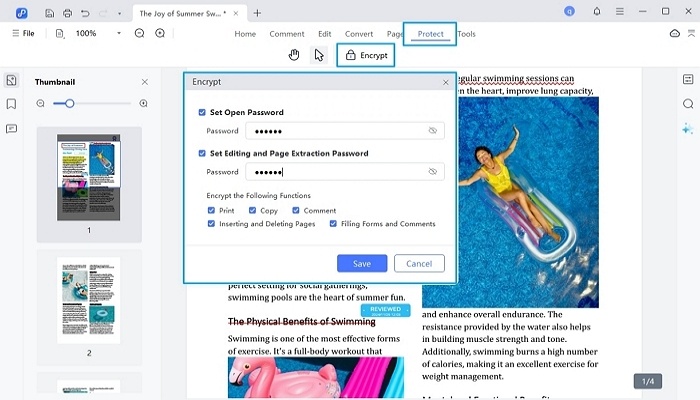
Protect and Secure PDFs: Security is a top priority, and PDNob PDF Editor for Mac allows users to protect sensitive information by adding passwords, encryption, and permissions to restrict actions like printing, copying, or editing. This feature is particularly useful for businesses and legal professionals who need to ensure that their documents are securely stored and shared with only authorized individuals.
AI-Powered Summarization: PDNob PDF Editor for Mac leverages artificial intelligence to analyze and summarize lengthy documents. The AI can generate concise overviews, providing users with key insights from long PDFs without the need to read through every page. This feature is especially useful for individuals or businesses that deal with large volumes of text, saving time and improving overall efficiency. Additionally, the AI-powered summarization function helps users extract critical information quickly, making document review processes faster and more efficient.
Compress PDFs: PDNob PDF Editor for Mac also offers a PDF compression tool that reduces the file size of PDFs without compromising quality. This is particularly useful for sharing large documents via email or uploading them to cloud storage services where file size may be a concern.
Cross-Platform Compatibility: Whether you’re working on a Windows PC or a Mac, PDNob PDF Editor is fully compatible across both platforms. It ensures a seamless user experience, enabling individuals and teams to work with PDFs on their preferred devices, enhancing flexibility and productivity.