Go to Windows platform Display platforms icon
Go to Windows platform Go to Mac platform Go to Android platform
Quick Share (Nearby) icon

Quick Share (Nearby)

135.0.7023.0
Google LLC
3.9
10.2 MB size
5downloads

Send files quickly from Android to Windows

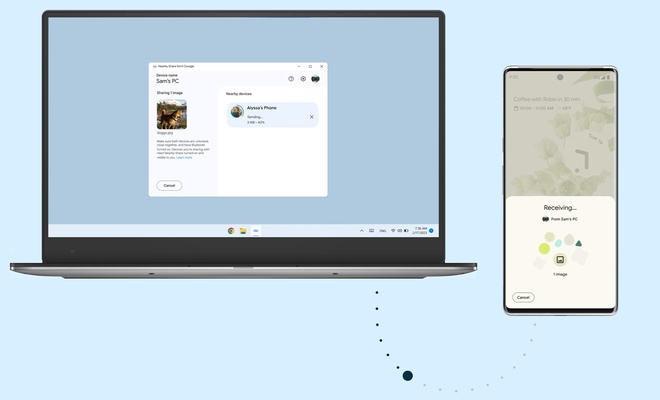
Quick Share (Nearby) is a Google-developed technology to send any file from your smartphone to a Windows-equipped PC. In a simple and effective way, you'll be able to share information between devices without the need to use WiFi or Bluetooth. It will even be possible to use the app without associating any account.

Quick Share (Nearby)'s operation could not be easier for the user. Once the tool is installed, it will be enough to define your privacy options to execute secure transfers. Note that you can always choose the devices to which you want to authorize access. After choosing a name under which you will be visible to others, you will be ready to start any information transfer.

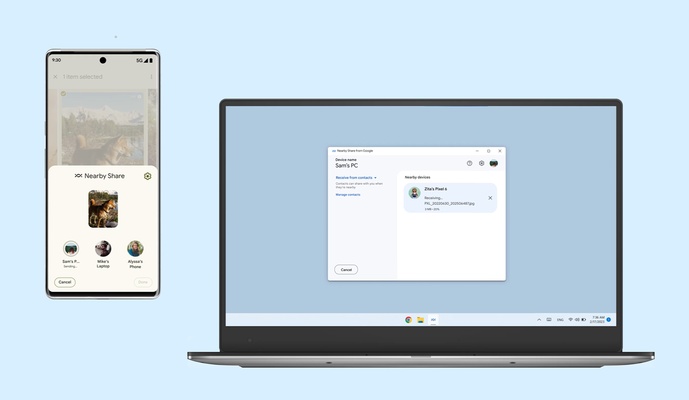
To transfer any file with Quick Share (Nearby), just tap on the file on your Android and then use the share function with Nearby Share. Here, you will select the receiving PC and start a process that will take more or less time to complete depending on the size of the shared information.

One of the key aspects when choosing Quick Share (Nearby) to transfer files is that it supports multiple files. This technology has full support for sharing photos, videos, documents, songs and even entire folders without any restrictions. All you'll have to do is consider the proximity between smartphone and PC so the process can be completed without interruptions.

Download Quick Share (Nearby) for PC and easily share files between an Android smartphone and a Windows computer. Send photos, videos and other files without WiFi and with maximum privacy, easily and for free.

Information about Quick Share (Nearby) 135.0.7023.0

License Free
Op. System Windows
Category Personal
Language English 47 more
Author Google LLC
permission icon Permissions Not applicable
Downloads 5
Date 2025-04-18
Size 10.2 MB
File type EXE
Architecture Not specified
Content Rating Not specified
Advertisement Not specified
Requirements
  • Not specified
SHA256 9e2204a9f5f3acfcaf102aeda89c8e05bd405ec4475804eca3caa1d71fbc5b99

Apps recommended for you

C-Organizer icon
A well-designed and practical planner
Gaia Sky icon
Powerful 3D simulator of the universe
All My Movies icon
Manage your movies with this useful tool
GUIPropView icon
NirSoft
Wintoys icon
Get the most out of Windows
OnionShare icon
Work with files and chat with friends anonymously
Right Click Windows Magic icon
Customize and enhance your context menu on Windows
Power Automate icon
Automate tasks and simplify processes
TomTom MyDrive Connect icon
Use and update your TomTom GPS from Windows
Ambie icon
Sounds to boost your concentration in front of the PC
ArsClip icon
Manage your clipboard in a simple way
Workrave icon
Avoid risks at work by planning your rests
GUIPropView icon
NirSoft
C-Organizer icon
A well-designed and practical planner
Metalith icon
A. A. Semyonov
OpenRGB icon
Easily customize your PC lighting
Advanced Diary icon
Full featured personal diary for free
Microsoft OneNote icon
Take customized notes and sync them on all your devices
Alternate DLL Analyzer icon
Display and extract function names from DLL files
GUIPropView icon
NirSoft
Cisdem ContactsMate icon
A contact manager for Windows with support for Google and Outlook
RedNotebook icon
Write down your day-to-day activities in this virtual diary
WizTree icon
Find and sort files that take up the most space on your hard drive
TomTom MyDrive Connect icon
Use and update your TomTom GPS from Windows