
Go to Windows platform Display platforms icon
Go to Windows platform Go to Mac platform Go to Android platform
MX_FFmpeg (Codecs for MX Player) icon

MX_FFmpeg (Codecs for MX Player)

1.87.0
USBhost
5
6.16 MB size
6downloads

Codecs for playing AC3, E-AC3, and DTS on MX Player

MX_FFmpeg (Codecs for MX Player) are the codecs needed to play movies and series with audio encoded in formats such as AC3 (Dolby), E-AC3, DTS, and TrueHD in MX Player on Android and Android TV. This player is one of the most widely used on Android, but due to licensing issues, it cannot include the official codecs for this content. So, you'll have to add them manually.

The file available for download here is a ZIP file that includes the necessary codecs for all types of architectures on which Android can run. These include ARM, ARM64, X86, and X64 architectures. If you're using an Android smartphone, the codec you're most likely to need is the 64-bit ARM codec, also called Neon64.

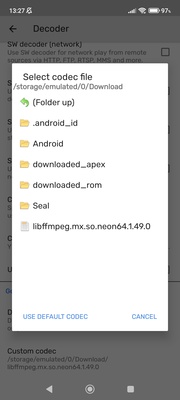
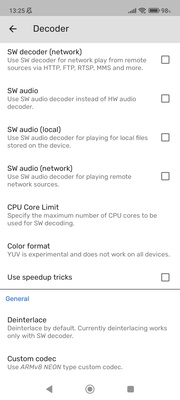
To make it work on MX_FFmpeg (Codecs for MX Player), go to the settings for MX Player. Then go to the Decoder section. Scroll to the bottom to find the "Custom Codec" option. From there, you can select the file you want from the ZIP you've extracted on your device. Restart the app once you've applied it, after which you'll be able to listen to various multimedia content without a problem.

So, if you want to enjoy the audio for any media file downloaded to your smartphone through MX Player, even if the audio is EAC3, don't hesitate to download MX_FFmpeg (Codecs for MX Player).

Information about MX_FFmpeg (Codecs for MX Player) 1.87.0

License Free
Op. System Windows

Category Video
Language English
Author USBhost
permission icon Permissions Not applicable
Downloads 6
Date 2025-04-18
Size 6.16 MB
File type ZIP
Architecture Not specified
Content Rating All ages
Advertisement Not specified
Requirements
  • Not specified
SHA256 d41b69776b8ca8d16ef5e62f84f9f6e0e7e39ace1c9e976964528204acbc1632

Apps recommended for you

UkeySoft Music Converter icon
Best Tool to Convert Spotify Music to MP3/WAV/M4A/AAC
K-Lite Codec Pack (Mega) icon
Play any video with this recommended kit
FFMPEG Audio Encoder icon
A powerful and easy-to-use video and audio encoder
EMDB icon
Manage your movie collection
Movavi Video Converter icon
Good choice to convert videos to iPod or PSP format
Shotcut icon
A cross-platform video editor for enhancing all kinds of media
Icecream Video Editor icon
Edit and create new videos and photos in minutes
ActivePresenter icon
Take screenshots and screencasts in a simple way
scrcpy icon
Control your smartphone and tablet from your computer
Kingshiper Screen Recorder icon
An easy-to-use Windows desktop screen recording software.
AVS Media Player icon
How to play your video and audio
JRiver Media Center icon
All your audio files at a glance
myFFmpeg icon
OSBytes
VideoPad Video Editor and Movie Maker Free icon
Easily create your own videos
HEVC Video Extensions from Device Manufacturer icon
Play HEVC (H.265) encoded videos on Windows
Zoom Player IPTV icon
Play your IPTV content
Media Player Classic - Home Cinema (MPC-HC) icon
An all-round great multimedia player
DVDVideoSoft Free YouTube to MP3 Converter icon
Download only audio from Youtube videos
Agent DVR icon
iSpyConnect
Replay Media Catcher icon
Download videos from hundreds of websites
DVDInfo icon
DVDInfo: A FREE program for generating information about DVD Discs.
DCP-o-matic icon
A useful tool for film projectionists
Media Player Codec Pack icon
Media Player Codec Pack for Windows 10 and 11